
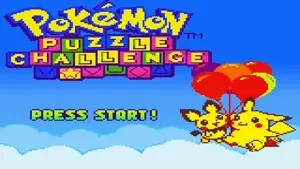


About Pokemon Puzzle Challenge
Step into the world of Johto with Pokemon Puzzle Challenge, a fast-paced puzzle game set in the beloved Pokémon universe. Originally launched for the Game Boy Color, this spin-off shifts from typical adventure and monster training to engaging panel-matching battles. Designed with inspiration from classics like Tetris Attack and Pokémon Puzzle League, it’s packed with dynamic, head-to-head gameplay that turns strategy into lively competition.
What adds a special Pokémon touch is its cast of characters! You’ll spot Johto favorites like Chikorita, Cyndaquil, Totodile, and others, including an appearance from adorable Pichu. Beyond just a matching game, every combo you create unleashes attacks, causing chaos for your opponents—whether they’re Johto Gym Leaders or friends in multiplayer! The vibrant Pokémon theme, combined with flashy combos, makes this game irresistible to pick up and hard to put down.
How To Play
Match. Chain. Battle.
The core gameplay revolves around swapping adjacent colored panels to line up matches of three or more, clearing them from the board. But the challenge doesn’t end there—set up chains and combos to activate cascading effects that score big or disrupt your opponent’s progress by dumping "garbage blocks" onto their screen.
Your ultimate goal? Keep your board clear while overwhelming your rival! Be aware—the field slowly creeps upward, and letting it reach the top ends the game.
Modes and Strategies
Pokemon Puzzle Challenge stays fresh with multiple modes to choose from:
- Challenge Mode: Take on the Johto Gym Leaders one by one, sending attacks their way as you clear the screen.
- Marathon Mode: A relaxing (but tricky!) mode where you aim to survive and chase high scores.
- Time Zone Mode: Speed matters here—match panels and score points before the countdown runs out.
- Line Clear & Puzzle Modes: Solve clever setups and tackle fixed objectives.
- Multiplayer Link Mode: Grab a friend and battle head-to-head using a link cable for added excitement!
Controls
| Action | Gamepad | Keyboard |
|---|---|---|
| A | Button 1 | Z |
| B | Button 2 | X |
| Select | Select | V |
| Start | Start | Enter |
| Up | D-Pad Up | ↑ Up Arrow |
| Down | D-Pad Down | ↓ Down Arrow |
| Left | D-Pad Left | ← Left Arrow |
| Right | D-Pad Right | → Right Arrow |